Running multiple Dagster agents
Each Dagster+ full deployment (e.g., prod) needs to have at least one agent running. A single agent is adequate for many use cases, but you may want to run multiple agents to provide redundancy if a single agent goes down.
When to use multiple agents
- For redundancy and high availability
- When you need to run agents in completely separate infrastructure environments or AWS accounts, with separate compute resources, volumes, and networks
- To dedicate specific agents for branch deployments
- To support multi-region failover
Considerations
- Additional infrastructure management overhead
- More complex configuration required for multiple agent setup
- Need to configure agent queues for proper workload routing
Running multiple agents in the same environment
To run multiple agents in the same environment (e.g., multiple Kubernetes agents in the same namespace), you can set the number of replicas in the configuration for your particular agent type:
- Docker
- Kubernetes
- Amazon ECS
In Docker
In Docker, you can set the number of replicas for a service in the docker-compose.yaml file if the deployment mode is set to replicated (which is the default):
services:
  dagster-cloud-agent:
    ...
    deploy:
      mode: replicated
      replicas: 2
In Kubernetes
In Kubernetes, the number of replicas is set in the Helm chart. You can set the number of replicas in the Helm command:
helm upgrade \
    ...
    --set dagsterCloudAgent.replicas=2
or if using a values.yaml file:
dagsterCloudAgent:
  ...
  replicas: 2
In Amazon ECS
In Amazon ECS, the number of replicas can be set via the CloudFormation template:
DagsterCloudAgent:
  Type: AWS::ECS::Service
  Properties:
    ...
    DesiredCount: 2
If using the CloudFormation template provided by Dagster, the number of replicas can be set via the NumReplicas parameter in the Amazon Web Services (AWS) UI.
Running multiple agents in different environments
To run multiple agents in an environment where each agent can not access the others' resources (for example, multiple Kubernetes namespaces or different clusters), enable the isolated_agents option. This is supported for all agent types.
- Docker
- Kubernetes
- Amazon ECS
In Docker
Add the following to the dagster.yaml file:
# dagster.yaml
isolated_agents:
  enabled: true

dagster_cloud_api:
  # <your other config>
  agent_label: 'My agent' # optional
In Kubernetes
Add the following options to your Helm command:
helm upgrade \
    ...
    --set isolatedAgents.enabled=true \
    --set dagsterCloud.agentLabel="My agent" # optional, only supported on 0.13.14 and later
Or if you're using a values.yaml file:
isolatedAgents:
  enabled: true

dagsterCloud:
  agentLabel: 'My agent' # optional, only supported on 0.13.14 and later
In Amazon ECS
The isolated_agents option can be set as per-deployment configuration on the dagster.yaml file used by your agent. See the ECS configuration reference guide for more information.
Routing requests to specific agents
Agent queues are a Dagster+ Pro feature and require agents to use version 1.6.0 or greater.
Every Dagster+ agent serves requests from one or more queues. By default, requests for each code location are placed on a default queue and your agent will read requests only from that default queue.
In some cases, you might want to route requests for certain code locations to specific agents. For example, routing requests for one code location to an agent running in an on-premise data center, but then routing requests for all other code locations to an agent running in AWS.
To route requests for a code location to a specific agent, annotate the code locations with the name of a custom queue and configure an agent to serve only requests for that queue.
Step 1: Define an agent queue for the code location
First, set an agent queue for the code location in your pyproject.toml:
# pyproject.toml

[tool.dg.project]
root_module = "quickstart_etl"
agent_queue = "special-queue"
Step 2: Configure an agent to handle the agent queue
Next, configure an agent to handle your agent queue.
- Docker
- Kubernetes
- Amazon ECS
In Docker
Add the following to your project's dagster.yaml file:
agent_queues:
  include_default_queue: True # Continue to handle requests for code locations that aren't annotated with a specific queue
  additional_queues:
    - special-queue
In Kubernetes
Add the following options to your Helm command:
helm upgrade \
    ...
    --set dagsterCloud.agentQueues.additionalQueues={"special-queue"}
Or if you're using a values.yaml file:
dagsterCloud:
  agentQueues:
    # Continue to handle requests for code locations that aren't
    # assigned to a specific agent queue
    includeDefaultQueue: true
    additionalQueues:
      - special-queue
In Amazon ECS
Modify your ECS Cloud Formation template to add the following configuration to the dagster.yaml file passed to the agent (the ECS agent configuration reference can be found here):
# dagster.yaml
agent_queues:
  # Continue to handle requests for code locations that aren't
  # assigned to a specific agent queue
  include_default_queue: true
  additional_queues:
    - special-queue
Multi-region failover
Multi-region failover uses agent queues, which are a Dagster+ Pro feature and require agents to use version 1.6.0 or greater.
Running agents in multiple geographic regions lets you fail over to a secondary region if your primary region becomes unavailable. The approach:
- Deploy one agent per region, each with a region-specific label and dedicated queue
- Assign code locations to the primary region's queue
- When the primary region is unavailable, update the queue assignment to point to the secondary region
Failover only requires updating the queue assignment because the agent is stateless — it polls for work but holds no persistent state of its own. All run history, asset metadata, schedule and sensor state, and event logs live in the Dagster+ control plane. Switching which agent handles a code location's queue doesn't require any state migration.
Step 1: Deploy agents with region labels
Deploy an agent in each region with isolated_agents enabled and a descriptive agent_label so you can identify which agent is active in the Dagster+ UI.
- Docker
- Kubernetes
- Amazon ECS
# dagster.yaml — us-east-1 agent
isolated_agents:
  enabled: true

dagster_cloud_api:
  # <your other config>
  agent_label: 'us-east-1'
# dagster.yaml — eu-west-1 agent
isolated_agents:
  enabled: true

dagster_cloud_api:
  # <your other config>
  agent_label: 'eu-west-1'
# values-us-east-1.yaml
isolatedAgents:
  enabled: true

dagsterCloud:
  agentLabel: 'us-east-1'
# values-eu-west-1.yaml
isolatedAgents:
  enabled: true

dagsterCloud:
  agentLabel: 'eu-west-1'
Set isolated_agents and agent_label in the dagster.yaml file for each regional agent. See the ECS configuration reference for details.
Step 2: Configure region-specific agent queues
Configure each agent to handle only its own region's queue:
- Docker
- Kubernetes
- Amazon ECS
# dagster.yaml — us-east-1 agent
agent_queues:
  include_default_queue: false
  additional_queues:
    - us-east-1
# dagster.yaml — eu-west-1 agent
agent_queues:
  include_default_queue: false
  additional_queues:
    - eu-west-1
# values-us-east-1.yaml
dagsterCloud:
  agentQueues:
    includeDefaultQueue: false
    additionalQueues:
      - us-east-1
# values-eu-west-1.yaml
dagsterCloud:
  agentQueues:
    includeDefaultQueue: false
    additionalQueues:
      - eu-west-1
Add the queue configuration to the dagster.yaml for each regional agent:
# dagster.yaml — us-east-1 agent
agent_queues:
  include_default_queue: false
  additional_queues:
    - us-east-1
# dagster.yaml — eu-west-1 agent
agent_queues:
  include_default_queue: false
  additional_queues:
    - eu-west-1
Step 3: Assign code locations to the primary region
In each code location's pyproject.toml, set agent_queue to the primary region:
# pyproject.toml
[tool.dg.project]
root_module = "my_project"
agent_queue = "us-east-1"
Performing a failover
When the primary region (us-east-1) becomes unavailable, point affected code locations at the secondary region's queue. You can do this by updating pyproject.toml and redeploying, or by editing the code location's agent queue directly in the Dagster+ UI.
- Code change
- No code change (hot reload)
Update agent_queue in each affected code location's pyproject.toml to the secondary region and redeploy:
# pyproject.toml
[tool.dg.project]
root_module = "my_project"
agent_queue = "eu-west-1"
Once the updated code location is deployed, the secondary region's agent handles all requests. No changes to the agent configuration are needed.
You can also update a code location's agent queue directly from the Dagster+ UI without redeploying:
-
In the Dagster+ UI, navigate to the Deployment tab.
-
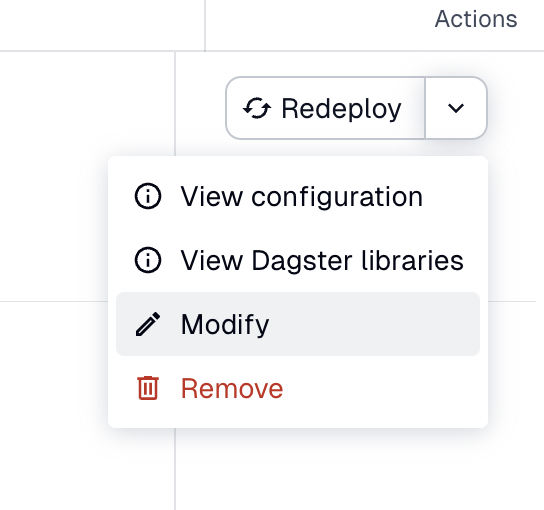
In the row for the code location you want to fail over, click the dropdown next to Redeploy in the Actions column, then select Modify.
-
In the Edit location dialog, update the
agent_queuevalue to the secondary region (e.g.,eu-west-1), then click Update code location.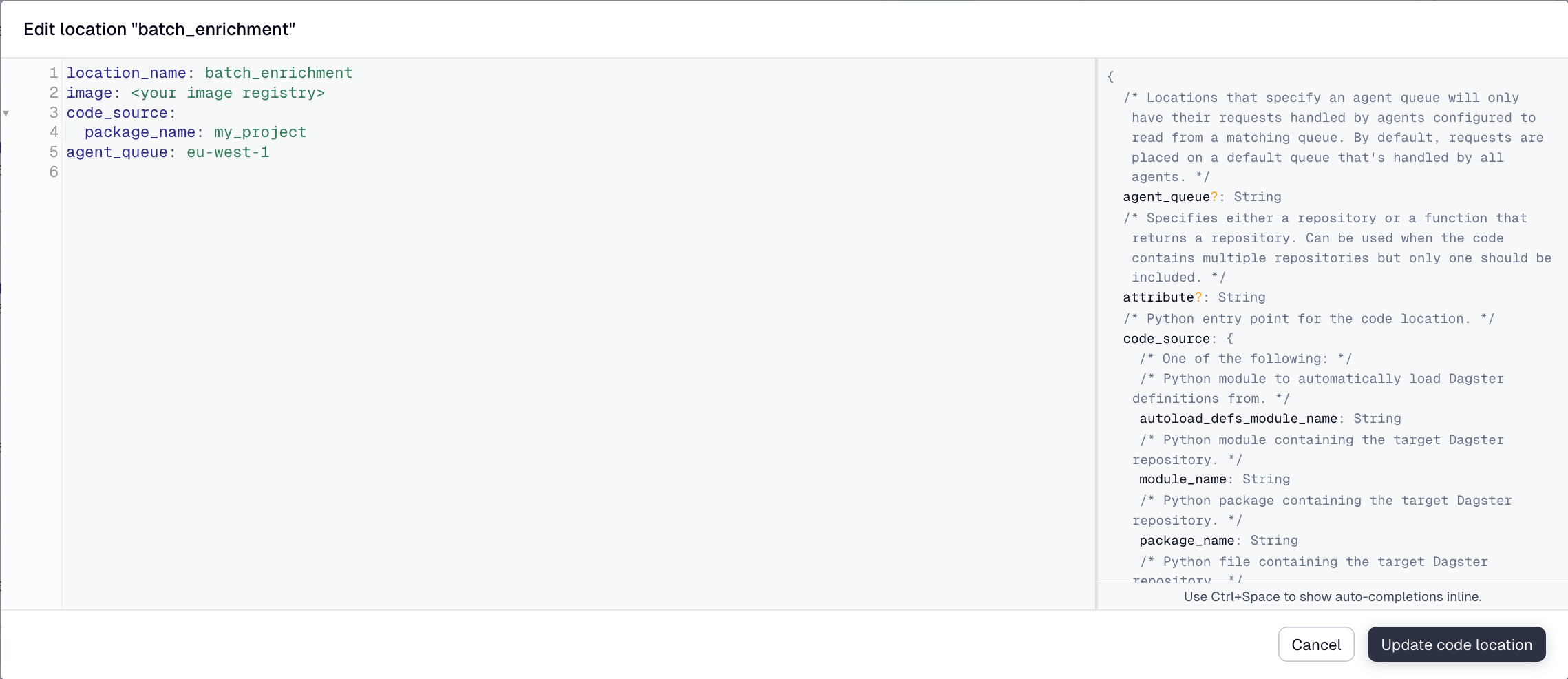
The secondary region's agent handles requests for the code location immediately, with no redeploy required.
Edits made through the Edit location dialog persist only until the next deployment from CI/CD, which overwrites the code location's metadata with the values from pyproject.toml. To make the failover durable across deploys, also update agent_queue in pyproject.toml using the Code change flow above.
Optional: Reduce standby costs
By default, user code server TTL is disabled for full deployments, meaning code location servers run indefinitely even when idle. In a standby region that isn't handling any traffic, this means you're paying to keep servers warm that aren't doing any work.
To reduce costs, set a short server_ttl in the standby agent's configuration. Code location servers will shut down when idle and restart on demand when the agent starts receiving requests after a failover:
- Docker
- Kubernetes
- Amazon ECS
# dagster.yaml — eu-west-1 standby agent
user_code_launcher:
  module: dagster_cloud.workspace.docker
  class: DockerUserCodeLauncher
  config:
    server_ttl:
      full_deployments:
        enabled: true
        ttl_seconds: 300 # shut down idle servers after 5 minutes
# values-eu-west-1.yaml — standby region
workspace:
  serverTTL:
    fullDeployments:
      enabled: true
      ttlSeconds: 300
# dagster.yaml — eu-west-1 standby agent
user_code_launcher:
  module: dagster_cloud.workspace.ecs
  class: EcsUserCodeLauncher
  config:
    server_ttl:
      full_deployments:
        enabled: true
        ttl_seconds: 300 # shut down idle servers after 5 minutes
The tradeoff is a brief startup delay (typically a few seconds) the first time a code location is accessed after failover, as the server initializes. For most use cases this is acceptable given the cost savings of not running idle servers in the standby region.
Optional: Active-active redundancy
To eliminate the need for a manual failover, configure each agent to listen on both regional queues. With this setup, both agents share the load from all code locations, and if one region becomes unavailable the remaining agent continues processing everything automatically.
- Docker
- Kubernetes
- Amazon ECS
# dagster.yaml — us-east-1 agent
agent_queues:
  include_default_queue: false
  additional_queues:
    - us-east-1
    - eu-west-1
# dagster.yaml — eu-west-1 agent
agent_queues:
  include_default_queue: false
  additional_queues:
    - us-east-1
    - eu-west-1
# values-us-east-1.yaml
dagsterCloud:
  agentQueues:
    includeDefaultQueue: false
    additionalQueues:
      - us-east-1
      - eu-west-1
# values-eu-west-1.yaml
dagsterCloud:
  agentQueues:
    includeDefaultQueue: false
    additionalQueues:
      - us-east-1
      - eu-west-1
# dagster.yaml — us-east-1 agent
agent_queues:
  include_default_queue: false
  additional_queues:
    - us-east-1
    - eu-west-1
# dagster.yaml — eu-west-1 agent
agent_queues:
  include_default_queue: false
  additional_queues:
    - us-east-1
    - eu-west-1
The tradeoff is that both agents run at full capacity at all times. Work is still placed on the queue specified by each code location's agent_queue setting, but since both agents monitor all queues, either agent may process it.